
The transition from individual experimentation with generative AI to team-wide operationalization is often where visual consistency goes to die. In the early stages, a single creator might find a “golden prompt” that produces a series of usable images. However, when that workflow is handed off to a content team, the output frequently begins to drift. Different interpretations of style, varying levels of prompt complexity, and the inherent randomness of latent diffusion models can result in a fragmented brand identity that feels more like a patchwork than a cohesive campaign.
For content teams, the challenge is no longer just “generating” an image; it is “governing” the image. Scaling visual identity requires moving beyond the prompt box and into a structured audit and alignment phase. This involves treating generative output as a raw material rather than a finished product, necessitating a reliable AI Photo Editor to bridge the gap between a raw generation and a brand-ready asset.
The Problem of Visual Drift in Generative Workflows
Visual drift occurs when the subtle nuances of a brand—color temperature, lighting direction, grain structure, and subject composition—are compromised by the decentralized nature of AI tool usage. Even with shared prompt libraries, different models (or even different versions of the same model) interpret instructions with enough variance to create friction in a layout.
For example, a team using Flux for one set of assets and Nano Banana for another might notice a discrepancy in how textures are rendered. One might lean toward hyper-realism, while the other maintains a slightly painterly quality. While these differences are small in isolation, they become glaringly obvious when placed side-by-side on a landing page or in a multi-slide social deck.
Teams often find that the initial output from a generator is rarely “final.” It is currently difficult, if not impossible, to achieve 100% brand compliance purely through text-to-image prompting. There is a persistent limitation in how these models handle specific spatial logic or the exact placement of brand-specific secondary elements. Expecting a model to get it right the first time every time is a recipe for operational bottleneck.
Establishing a Style Truth through Audits
Before a team can scale, they must define their “Style Truth.” This is a documented benchmark of what an “on-brand” AI asset looks like. Auditing involves taking a representative sample of 50 to 100 generated images and categorizing them based on their adherence to brand standards.
The audit should focus on three primary pillars:
- Chromatic Consistency: Do the shadows carry the correct cool or warm tones?
- Structural Integrity: Are there artifacts in the background that distract from the focal point?
- Contextual Logic: Does the lighting in the image match the supposed environment?
Once these gaps are identified, the team can establish a remediation workflow. This is where the workflow shifts from generation to modification. Rather than discarding an image that is “almost there,” teams should utilize an AI Image Editor to correct lighting, remove distracting objects, or swap out backgrounds to meet the established style truth.
Integrating Post-Generation Control Layers
The most efficient content teams treat the AI generator as the “first draft” engine. The real work happens in the editing layer. This layer serves as a quality control gate that ensures every asset, regardless of which designer prompted it, feels like it came from the same studio.
One common point of failure is the “hallucination” of background details. A generator might create a perfect subject but place them in a room with nonsensical architecture or distracting clutter. Instead of re-running the prompt dozens of times—which wastes credits and time—operators use object removal and background replacement tools. This allows the team to maintain the high-quality subject while standardizing the environment.
Another critical limitation to account for is the “uncanny” nature of AI-generated faces or hands in certain models. While the tech is improving rapidly, there are still moments of uncertainty where a high-resolution generation might look great at a distance but fail upon close inspection. Teams must bake a “Face Swap” or “Detail Enhancement” step into their SOPs to ensure that human subjects look natural and consistent across a series of assets.
Refining the Workflow: From Text to Image to Iteration
Operationalizing these tools requires a shift in mindset from “one-and-done” to an iterative loop. A standard workflow might look like this:
Phase 1: Foundation. Use a high-performance model to generate the base concept.
Phase 2: Restoration. Use an upscale tool to bring the resolution to a production-ready standard (usually 2x or 4x).
Phase 3: Alignment. Open the asset in a dedicated editor to perform “In-painting” or “Out-painting.” If the composition is too tight, expanding the borders allows for better text placement in marketing materials.
Phase 4: Brand Injection. Adding specific brand elements, adjusting color filters to match the corporate palette, and removing any lingering AI artifacts.
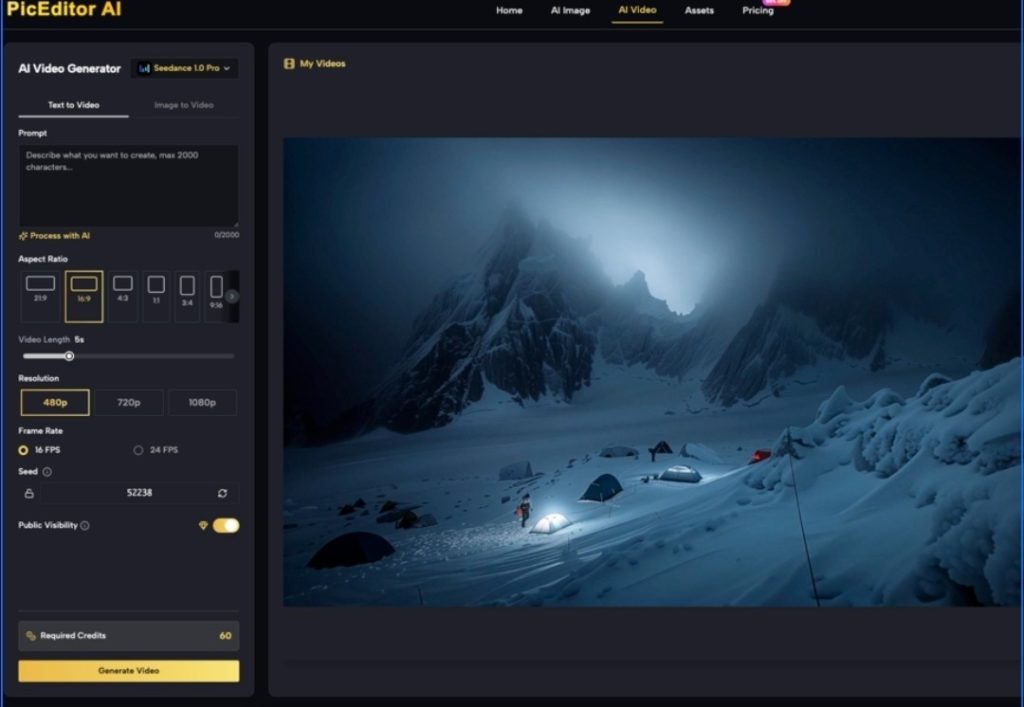
Platform features such as those found in PicEditor AI allow teams to toggle between different models like Kling for motion or Flux for stills while keeping the editing interface consistent. This reduces the “tool fatigue” that often plagues teams who have to jump between five different browser tabs to finish a single social media post.

Managing the Feedback Loop and Team Training
Consistency is a byproduct of shared knowledge. When a team member discovers a way to fix a common AI error—such as a specific way to handle “over-saturated” pixels—that knowledge needs to be codified.
Teams should maintain a “Redlines” document. This isn’t just a style guide; it’s a technical guide for generative editing. It might include instructions like: “All AI-generated portraits must run through the Face Enhancer at 50% opacity to ensure skin texture remains realistic,” or “Always use the Object Eraser to remove text-like artifacts in the background.”
It is also important to set expectations regarding what the tools cannot do. For instance, if a brand requires hyper-specific product placement (like a proprietary hardware component), current AI Image Editor capabilities might struggle to render it with 100% engineering accuracy. In these cases, teams should be taught to generate a high-quality “lifestyle” environment first and then manually composite the real product into the scene, rather than hoping the AI will “know” what the product looks like.
The Role of Upscaling and Enhancement
Resolution remains a major hurdle for teams moving assets from digital-only to print or high-definition display. Most base generations are capped at a resolution that looks fine on a smartphone but falls apart on a desktop monitor.
A production-savvy team incorporates an upscaling step as a non-negotiable part of the pipeline. However, upscaling isn’t just about adding pixels; it’s about maintaining the integrity of the original “Style Truth.” Modern AI Photo Editor tools use generative upscaling to fill in missing details without introducing new, unbranded elements. This step is often where the “AI feel” is either mitigated or exacerbated. If the upscaler is too aggressive, it can create a plastic-like texture that screams “generated content.” Finding the right balance of “denoising” versus “detail retention” is a key skill for any creative operations lead.
Conclusion: Beyond the Generative Horizon
Scaling a visual identity in the age of AI is less about the prompt and more about the audit. As generative media tools become more accessible, the barrier to entry for content creation drops, but the barrier to consistency rises.
Content teams that succeed will be those that treat generative assets with the same skepticism and rigor as they would a third-party stock photo library. By integrating a dedicated AI Image Editor into their daily production pipelines, teams can move from the chaos of random generations to the precision of a scaled visual system. This approach acknowledges the current limitations of the technology—the hallucinations, the resolution caps, and the stylistic drift—and provides a practical framework for overcoming them. In the end, the goal isn’t just to produce more content; it’s to produce content that actually belongs to the brand.

